
Get farcaster frames right
Use this section to make the Farcaster decision easier to compare in real life, not just on paper. Start with the reader's actual constraint, then separate must-have requirements from details that are merely nice to have. A practical choice should survive normal use, maintenance, timing, and budget. If a recommendation only works in an ideal situation, call that out plainly and give the reader a fallback path.
The simplest way to use this section is to write down the must-have criteria first, then compare each option against those criteria before weighing nice-to-have features.
Build a Farcaster Frame
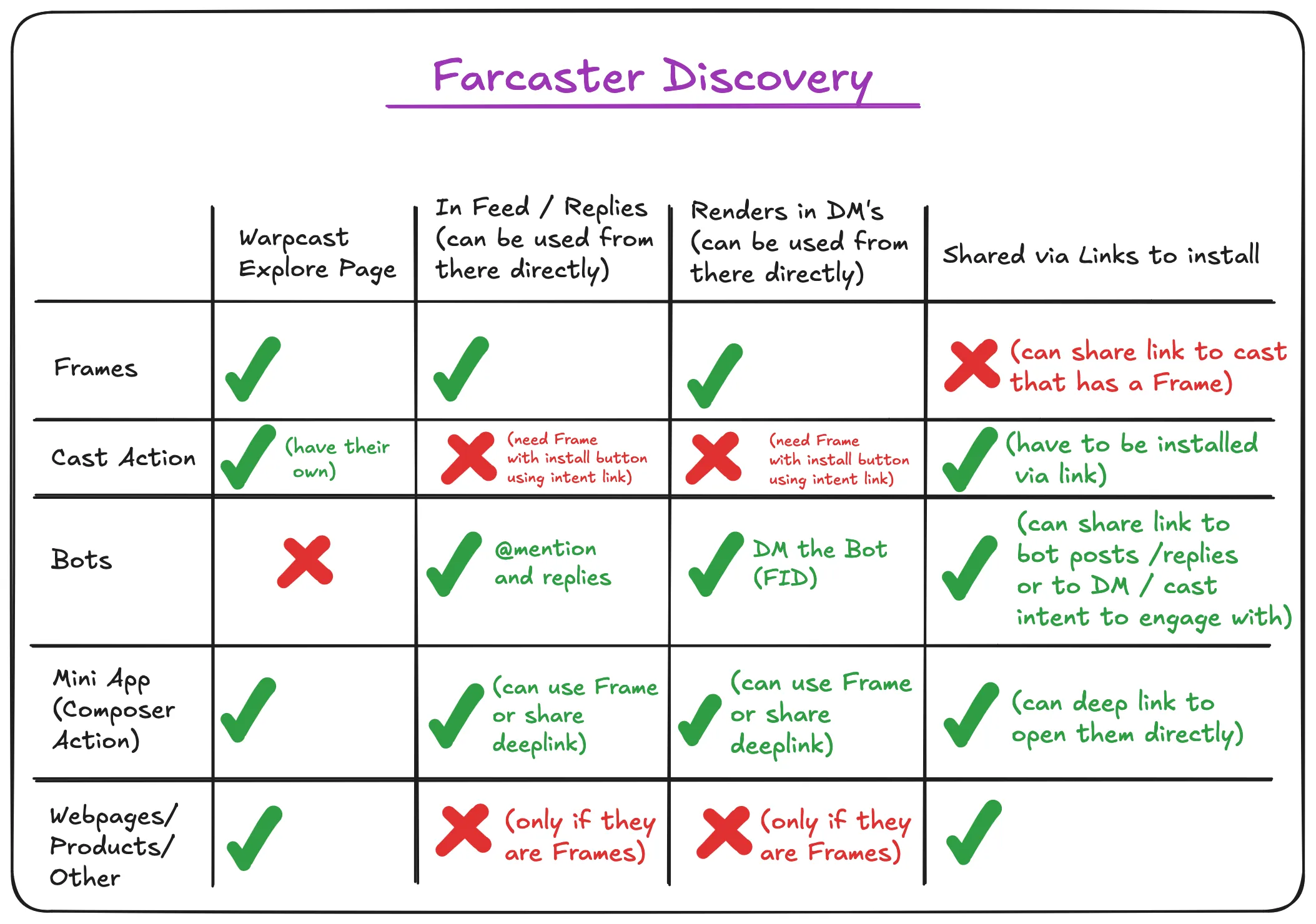
Farcaster frames turn static Casts into interactive mini-apps. Instead of just reading text, users can vote, play games, or mint NFTs without leaving the feed. This section walks through the technical steps to build, test, and deploy your first frame.
1. Set Up the Development Environment
Start by initializing a Next.js project. Frames are rendered as web pages, so a standard React framework works best. Install the necessary dependencies, including @farcaster/frame-sdk for interaction and viem for wallet connectivity. Ensure your local development server is running on a secure port, as frames require HTTPS endpoints to function correctly.
2. Create the Frame Manifest
Every frame needs a manifest file, typically frame.json, placed in your project root. This file tells Farcaster clients how to render your content. Define the version (currently "next"), the name of your app, and the iconUrl. Most importantly, specify the homeUrl, which points to the initial HTML page that loads when a user opens the frame. This URL must be publicly accessible.
3. Build the Interactive UI
Design the user interface using standard HTML and CSS. The frame SDK provides hooks to manage state and handle button clicks. When a user interacts with a button, the frame should return an ActionResponse that tells the client whether to refresh the frame, navigate to a new URL, or trigger a transaction. Keep the UI lightweight; frames load quickly to maintain engagement within the social feed.
4. Handle Wallet Connections
Integrate wallet functionality using viem or a similar library. Frames often need to sign messages or execute on-chain transactions. Use the Farcaster SDK to request signatures from the user’s connected wallet. Ensure you handle errors gracefully, such as when a user rejects a signature or when network fees fluctuate. Test these flows thoroughly to prevent broken interactions.
5. Test with the Farcaster Debugger
Before deploying, use the Farcaster frame debugger to validate your implementation. Paste your homeUrl into the debugger tool to simulate how different clients will render your frame. Check for common issues like missing manifest fields, incorrect button actions, or broken image links. The debugger provides immediate feedback, saving you from deploying broken frames to the network.
6. Deploy and Share
Deploy your frame to a static hosting provider like Vercel or Netlify. Once live, generate a Cast containing your frame’s homeUrl. Farcaster clients will automatically detect the frame manifest and render the interactive app. Share the Cast to gather user feedback and iterate on the design based on real usage data.
Set up a Next.js app and install @farcaster/frame-sdk and viem.

Define frame.json with version, name, and homeUrl.
Create the HTML/CSS interface and handle button clicks with ActionResponse.
Integrate viem for signing messages and executing transactions.
Use the Farcaster debugger to validate rendering and interactions.
Host on Vercel/Netlify and share via a Cast.
Common Mistakes When Building Farcaster Frames
Even with robust tooling, Frame development has a steep learning curve. The gap between a working prototype and a polished, user-friendly app often comes down to small oversights in metadata, state management, or error handling. Below are the most frequent pitfalls and how to avoid them.
Ignoring Open Graph Metadata
Frames render inside social feeds as interactive cards. If your og:image or og:description is missing or malformed, the frame appears as a broken link or plain text. Always validate your metadata using the Facebook Sharing Debugger or similar tools before deploying. A missing thumbnail is the fastest way to lose user attention.
Mismanaging State and Buttons
Frames are stateless by default; each interaction triggers a new request. A common error is assuming that button clicks persist data without explicit state handling. Ensure every button click returns the updated imageUrl or postUrl to reflect the new state. If you fail to update the image URL after an action, the user sees a frozen interface that doesn’t respond to their input.
Overlooking Error Handling
Network requests to Farcaster hubs can fail. If your Frame crashes during a request, the UI breaks for the user. Wrap your hub interactions in try/catch blocks and return a fallback image or a user-friendly error message. Never let a raw 500 error appear in the feed; it damages trust and confuses users who don’t understand the backend infrastructure.
Skipping Mobile Testing
Most Farcaster interactions happen on mobile. If your Frame layout breaks on smaller screens, you lose the majority of your audience. Test your Frame on both iOS and Android clients early. Ensure buttons are large enough to tap and text is readable without zooming. A desktop-first design is a mobile-first failure.
Farcaster frames: what to check next
Frames are the reason decentralized social media feels native in 2026. By embedding interactive mini-apps directly into social posts, Farcaster removes the friction of leaving an app to complete simple actions.
Here are the most common practical questions about building and using frames.
No comments yet. Be the first to share your thoughts!